Before running Repair Wall
An identified wall/gate and damage meeting the configured minimum threshold.
Windows + LDPlayer. Follow the current setup guide; account unlocks and game state determine eligibility. Read the setup guide.
Expected result and verification
Normal wall maintenance is applied when eligible.
Use the repair/maintenance result on the identified wall, not camera movement alone.
Damage is below the configured threshold
Normal repair is not currently available
These are operating contracts, not an assertion that every account or branch has passed. An attempted interaction, a configured control and a verified run are different evidence.
What can need attention?
A camera that fails to settle on the gate or damage below the threshold should not lead to a guessed repair input.
- The destination or required control cannot be identified safely.
- A possible side effect cannot be reconciled.
- The bounded action or recovery deadline is exhausted.
- The observed state falls outside the released support contract.
See the actual configuration interface
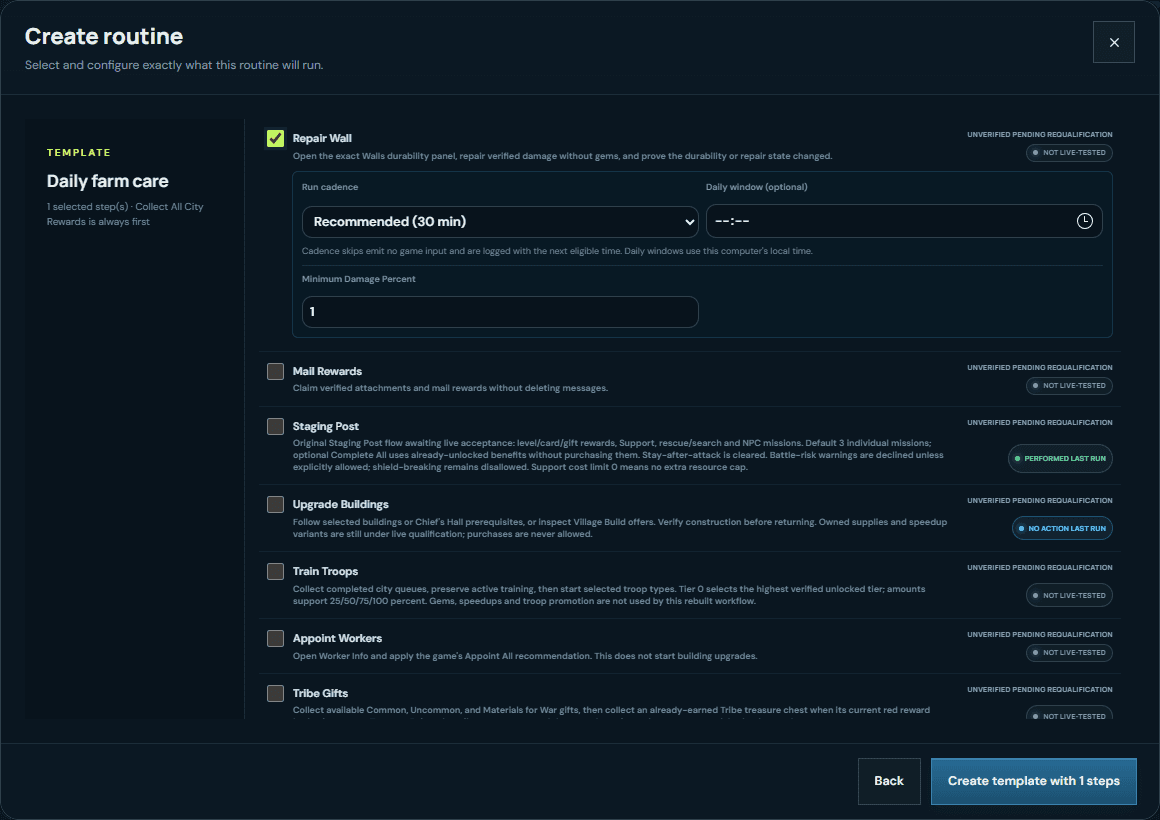
Play the recorded interface walkthrough
This demonstrates configuration controls, not the game action completing or reliability across farms.
No verified-success execution case is published in this guide. The interface recording is not being presented as one.
Question about this workflow
Will it use gems to repair?
No. The published scope excludes gem repair; damaged-wall acceptance also needs an account with damage available.