Routine Builder
Order active-catalogue actions and expose supported settings, cadence and assignment without editing scripts.
THE VRA PRODUCT TOUR
See which farms are ready, set their routines and find the results that need a closer look. Explore genuine development captures and short recordings, with the settings and operating boundaries explained.
NOT A MOCK-UP. A REAL RUN.
Follow the highlighted controls as VRA configures a troop batch, starts training and confirms the result. Short on-screen notes explain every step.
The highlighted troop and batch controls show exactly what VRA selects.
Watch the blue Train button become an active queue. No instant-training purchase.
The GUI records the completed action. The game’s training timer continues normally.
Actual single-action Lab validation, recorded 23 September 2026. Continuous screen recordings, presented at 2× speed with idle waits trimmed and explanatory annotations added; the final result plays at normal speed. Initial preparation is omitted. Account HUD, chat and developer internals are excluded. The recording shows a verified training start; the normal in-game training timer continues afterward. Playback loops after you press play; pause at any time.
Explore all 26 action settingsFOLLOW THE LAUNCH
Join for development, testing and launch updates. VRA remains pre-release; signup is not a purchase, trial activation or guaranteed beta place.
THE REAL PRODUCT. YOUR OWN PACE.
Choose the jobs your farms need, then set their boundaries. Pick a short recording to see the real controls for gathering, training, rewards and more.
CHAPTER 01 / 27
Choose a reusable routine and select its actions in the real VRA routine builder. The recording selects Collect All City Rewards in an unsaved routine. Creating a routine and running one are separate choices.
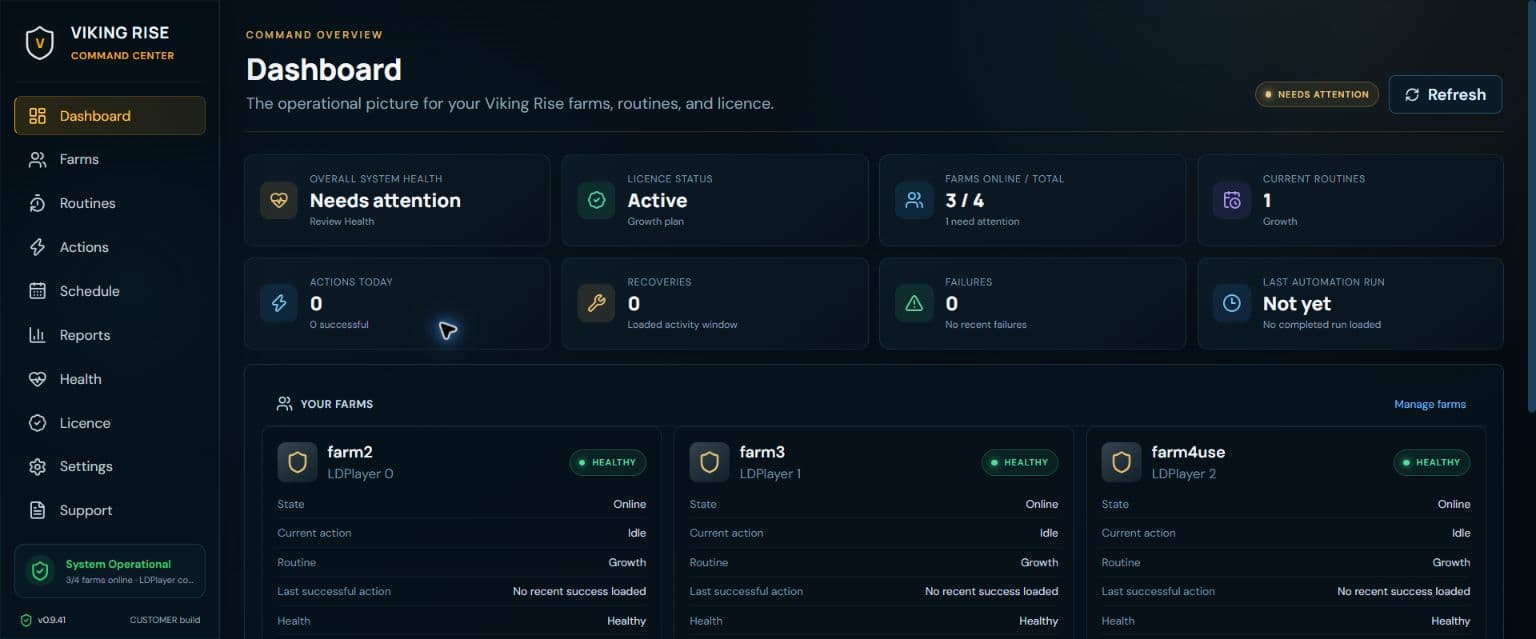
MORE OF THE CUSTOMER INTERFACE
Switch views, open the full capture and read the customer decisions each screen exposes.
01 / ACTUAL CUSTOMER INTERFACE
Fleet readiness, currently running work, the next schedule, recent outcomes and attention states in one customer surface.
Actual VRA development interface, captured in September 2026 with example account state.
THE OPERATIONS LOOP
The screenshots above are the current public captures. These cards introduce the additional customer surfaces in the development interface.
Order active-catalogue actions and expose supported settings, cadence and assignment without editing scripts.
See which routines are assigned, when they become eligible and which farms are waiting for capacity.
Read the ordered customer-visible stream instead of digging through a raw log file.
Inspect outcomes, timestamps, action context and relevant captures across the fleet.
Review completed work, existing queues, game availability and tasks needing attention in separate outcome groups.
See bounded retries, circuit state and attention without silently forcing another attempt.
Separate Windows, service and emulator problems from automation results.
Preview, review and deliberately import supported GnBots configuration.
THE EVERYDAY FLOW
You should not need to edit automation code to operate a farm.
Select the exact LDPlayer profiles. Farms can keep different assigned routines.
Pick active actions, arrange order and set customer-facing limits.
Start deliberately or set a cadence, then follow outcomes and evidence.
THE MEMORABLE PART
See the outcome language, retry decision and customer-visible record that sit behind a result.
FOLLOW THE LAUNCH
Join for development, testing and launch updates. VRA remains pre-release; signup is not a purchase, trial activation or guaranteed beta place.