At launch
- Script-based farm workflows, evidence and customer controls.
- Optional example collection during normal VRA runs.
- Default-off consent, privacy controls, review and withdrawal.
- A contribution pipeline ready before customer release.
VRA VISION LAB / BEHIND THE BUILD
Viking Rise does not keep every target in the same place. Animals move and scenery changes. Sector Vision explores how VRA can recognise what is on screen and follow a moving target, instead of relying on a fixed position. Below are the real captures, local recognition work, development checks behind that goal.
VRA is pre-release. The specialist detector below is in controlled validation. Explore the specialist recognition work here and the later experimental-model roadmap below.
INSIDE SECTOR VISION / DEVELOPER FIELD NOTES
A deer turns. A sheep walks away. The light changes. The gold guide stays behind. City Event Reports asks a harder question than “does this look exactly like my reference image?”
SPECIALIST DETECTOR · CONTROLLED VALIDATIONCity errands bring moving animals, changing light and varied scenery into the same workflow. A focused detector can learn the visual patterns shared across those different views.
We are training a focused visual detector to locate the animal body or resource patch from learned appearance. The goal is to keep recognition focused on the current object as the scene changes.
Templates still have a place for stable interface controls. The experimental detector addresses the changing scene, while deterministic workflows retain permissions, timing, recovery limits and verification.
A recognition proposal must still correspond to a current, eligible target. It does not authorise a blind click or turn an attempted action into a successful one.
OPEN THE FIELD NOTEBOOK
Explore real examples. Toggle the reviewed boxes to inspect the original crop, then compare animals, resources and intentional negatives.
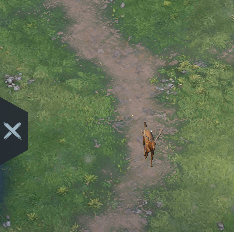 REVIEWED LABELS
An animal can look narrow from the front. Training needs more than its easiest side profile.
The annotation marks what training should find—not what the model has just predicted.
Reviewed development annotations show the objects included in the current training examples. Toggle the boxes to inspect the original captures.
Small, privacy-reviewed excerpts from developer captures. Account names and the full game HUD are outside these crops. Game artwork belongs to its respective rights holders; VRA is independent of IGG.
Both are represented in the current training set, across poses and lighting. They share an animal-target label: the detector is learning where an animal body is, not producing a species name. Resource examples broaden the lesson to berries, timber, ore/material piles and fishing spots. This is the current training scope, not coverage of every animal in the game.
The pipeline has produced recognisable targets and bounded animal-collection trials. Current development expands recognition coverage and evaluates it within live workflow checks.
FROM CAPTURE TO CANDIDATE
A model is not finished when the progress bar reaches the end. The important question is how it behaves on examples it was not trained on.
Real game crops include different poses, lighting, backgrounds and partial obstructions. Ten nearly identical screenshots are not ten independent demonstrations.
A box marks the visible animal body or resource patch. People, chests and empty ground also matter: they show the detector what should not receive a target box.
Offline training compares predictions with the reviewed labels and adjusts numerical parameters. We refine general visual foundations using VRA-specific examples; we are not teaching a model from a blank slate.
Training examples update the model. Validation examples guide checkpoint selection. Held-out examples test the frozen candidate. Whole run groups stay together, and one farm is reserved for testing.
We check that the exported model reproduces its reference predictions, then evaluate live behaviour under bounded permissions. A plausible box is not permission to tap, spend or report success.
THE TERMS, WITHOUT THE MYSTIQUE
It means changing learned numerical parameters—not writing a rule for every deer, saving every possible screenshot, or asking a language model to guess where to click.
This focused detector work is separate from the later experimental vision/language-model roadmap below.
Weights are numerical parameters inside the model. Together they influence how pixels become visual features and how those features become proposed target boxes. Training adjusts them to reduce mistakes. They are not handwritten coordinates, a folder of screenshot matches, or a confidence percentage.
The learned pattern can transfer to another pose. It still has to be tested.
The coloured boxes on this page are reviewed development annotations. They tell training where a target is and which target group it belongs to. An empty annotation is deliberate when the crop has no relevant target. These labels are not live model predictions or independently human-certified ground truth.
Bad or ambiguous labels can teach the wrong lesson, so uncertain examples are excluded.
Loss measures disagreement between predictions and training labels, including target classification and box placement. The optimizer uses that feedback to update weights. Lower training loss alone does not show that the model will behave better on a different farm.
Learning the training examples is not the same as generalising.
A checkpoint saves a model at a particular stage of training. We compare candidates on validation data and keep the best eligible version, which can be an early checkpoint rather than the final one. Another thirty minutes of training does not automatically produce a better model.
Keep the evidence and the version together. Do not promote a model just because training finished.
A detection score describes the model’s support for a proposed target. It is not automatically a calibrated probability, a guarantee that the target can be clicked, or a measure of whole-routine reliability. A high score on the wrong object is still a false detection.
Fresh observations and action verification remain necessary.
A small or repetitive dataset can make a model look excellent on familiar images while it misses a different pose or background. Varied examples, separated run groups, negative scenes and held-out farms help reveal that gap. They do not remove the need for broader testing.
The next unfamiliar animal is more informative than another perfect score on a familiar frame.
Our aim is dependable recognition across the changing city. We publish a small window into that work—not the private dataset, model weights or implementation. The gallery shows the current training scope; the specialist detector remains in pre-release development.
The initial release will use premade, deterministic workflows. They record what was observed, what was attempted and what was verified. That record connects each action to the game state it produces.
At launch, optional dataset contribution is part of the release plan: with explicit opt-in, VRA will select useful examples during normal automation, apply privacy controls and contribute approved examples to Young Studio’s VRA dataset. Manual screenshot preparation will not be required for everyday contribution.
We are building Young Studio’s own VRA model. We will train and evaluate it using teacher-labelled development examples and optional contributions from customers running VRA. Customers contribute examples—not train or maintain separate models themselves. Training and evaluation happen offline—not on the customer’s PC during a farm run.
We will compare candidate model versions against the script-based baseline on held-out examples and internal end-to-end runs. Completing work, handling uncertainty, respecting permissions and avoiding unintended actions matter more than a persuasive prediction.
The experimental VRA vision/language model is planned for a later iteration—not the initial launch. We will release it only after internal testing demonstrates an improvement over the script-based automation baseline. Contributions do not immediately change a live farm’s behaviour. Qualified versions will arrive through VRA updates.
Whether a workflow uses scripts or a qualified model, spending permissions, workflow limits and replay guards remain the control boundary. A model cannot grant itself permission or turn uncertainty into a completed result.
YOUR DATA IS NOT THE DEFAULT
The model will be ours. The decision to contribute examples will remain yours. Declining will not reduce core farm automation.
SEE THE OBSERVATION AND RESULT
Inspect the real paired training recording and the evidence behind a verified result. One demonstration is not a fleet-wide reliability benchmark.